
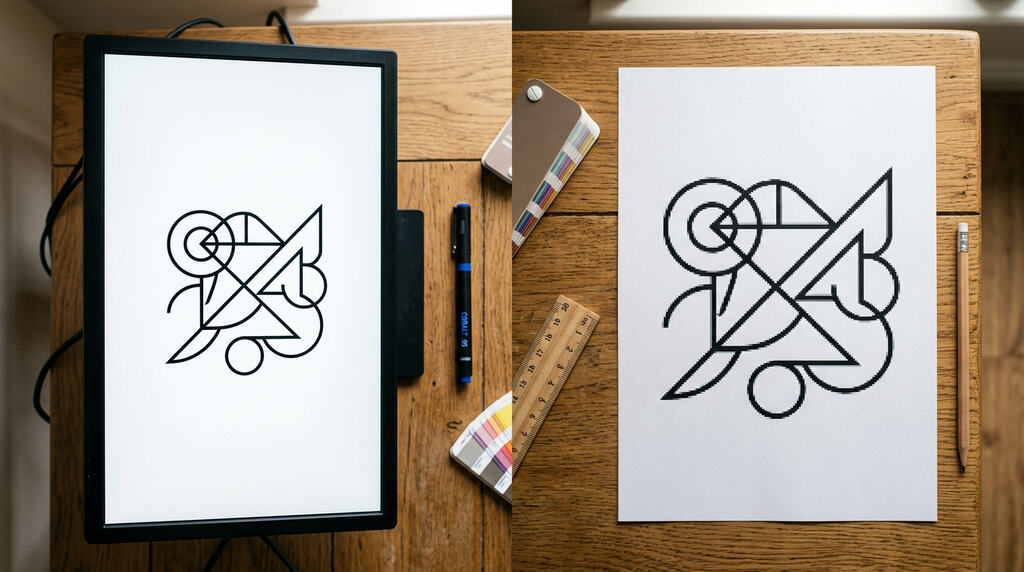
"Is a JPG enough, or do you really need vectors?" "What is a PMS colour and why does my printer keep asking for it?" "Can I just send the logo from Canva?" These are the most common questions we get from companies and marketers preparing promotional products with printing for the first time. The good news: in most cases the logo just needs a small tune-up — and when it doesn't, our graphic team will gladly help. In this guide we walk you through everything that decides whether your printed logo looks crisp on a pen, a hoodie, a ceramic mug or an engraved Parker.
Key principle: The print quality is decided before production starts — by the file you send us. A clean vector logo with the right colours can be printed on almost anything; a low-resolution JPG pulled from a website will look blurred even on the best machine. The aim of this guide is simple — to help you send print data that will look great on the final product, and to show where we can step in if your logo is not print-ready yet.
What you will need before sending your logo
Before you fill in our inquiry form or email us your brief, it pays off to check a few basics. You don't need to prepare anything fancy — but the more of these you can tick off, the faster we can quote you and the better the final print will look.
- The logo in vector format — ideally
.ai,.eps,.pdfor.svg. Vector means the logo can be scaled from a pen clip to an umbrella panel without losing sharpness. If you only have a JPG or PNG, send what you have — we will tell you whether it is usable or whether a re-draw is needed. - Text converted to curves (outlines) — so that the fonts in your logo display correctly even on a computer that doesn't have them installed. In Adobe Illustrator: Type → Create Outlines. In CorelDRAW: Object → Convert to Curves.
- Colour definitions — ideally Pantone (PMS) codes for your brand colours. If you don't know them, CMYK or at least RGB values are fine and we will match them as closely as the technology allows.
- An idea of the products — pens, mugs, t-shirts, USB sticks, bags? Each technology has slightly different requirements, so knowing the product helps us recommend the best logo treatment.
- Quantity and deadline — these don't affect the logo itself, but they help us pick the right technology (e.g. screen printing vs. DTG for t-shirts) which then affects what kind of logo file works best.
If you are missing any of these, don't worry — 30 minutes of graphic work are included free of charge with every inquiry. Our designers will check your file, convert what is needed, and send you a digital preview before anything goes to print. You can read more about how we handle print preparation in our help and advice section.
Vector vs. raster — the fundamental difference
A vector logo is built from mathematical curves and shapes — it can be enlarged from a pen clip to a billboard and stay perfectly sharp. A raster (bitmap) logo is built from pixels — fine on screen at the original size, but when you enlarge it for print, the edges break into squares and the logo looks fuzzy. For promotional printing, vector is almost always the right answer. If you would like a deeper dive into the differences, see our explainer on raster graphics.
File formats: which to send, which to avoid
Not every file with your logo inside is print-ready. Here is the short version of what works and what doesn't:
- AI (Adobe Illustrator) — the gold standard. Native vector format, fully editable.
- EPS — universal vector format, opens in Illustrator, CorelDRAW and Inkscape.
- PDF (vector) — works as long as the logo was exported from a vector program. A PDF that contains only a scan or a JPG inside is not a vector file.
- SVG — modern web vector format, perfect for digital and equally usable for print.
- JPG / JPEG — raster, with compression. Acceptable only for photos, not for logos. Suitable for the smallest digital print at most.
- PNG — raster, supports transparency. Usable for small digital prints if the resolution is at least 300 DPI at the final print size.
- TIFF — high-quality raster, used for photographs in print. Not ideal for logos.
Rule of thumb: if your logo is going on a pen, USB stick, mug or umbrella — send vector. If you only have a raster file, our graphic team can usually re-draw it into vector as part of the 30-minute graphic preparation that is free with every inquiry.
Colours: PMS (Pantone), CMYK, RGB — when to use what
Colour management is where most logo problems start. The same brand red can look completely different on a screen, on a printed flyer and on a screen-printed t-shirt — unless you give the printer a clear colour reference.
- PMS / Pantone (spot colour) — the most accurate way to define a colour for print. Each Pantone code corresponds to a physical ink mixed by recipe. Used for pad printing, screen printing and anywhere the brand colour must match exactly. If your brand book lists "Pantone 186 C", we mix that exact ink.
- CMYK — the four-process colour model (Cyan, Magenta, Yellow, Black). Used for full-colour printing (UV digital, DTG, DTF, sublimation). CMYK can reproduce most colours, but not all Pantones — some neon, gold or deep blue shades sit outside the CMYK gamut.
- RGB — the screen colour model (Red, Green, Blue). Used for monitors and the web. RGB is not for print — if you only have RGB values, we convert them to the closest CMYK or Pantone equivalent, but expect some shift.
Pro tip: for brand-critical orders (corporate gifts, merch for a campaign), always send Pantone codes. If you don't know them, send a printed sample of your brand colour or your brand manual — we will match it.
Logo for screen printing (textiles, bags, umbrellas)
Screen printing uses one screen per colour, so the ideal logo for screen printing is built from solid spot colours (Pantone) with clean edges. Each colour means one more screen and one more print pass, so 1–3 colours keep the unit price low. Avoid gradients, soft shadows and photographic effects — these are technically possible (halftone screens), but they raise the price and complexity. Send vector, with text converted to curves, and ideally Pantone codes for each colour.
Logo for pad printing (pens, USB sticks, lighters)
Pad printing transfers ink from a cliché onto curved or small surfaces — pens, USB sticks, keychains, lighters. The print area is small (typically 50 × 8 mm on a pen), so simplicity wins. Thin lines under 0.25 mm tend to break, small text under 6 pt becomes unreadable, and very fine details fill in. Send vector, keep it bold and legible, and stick to 1–4 spot colours.
Logo for DTG / DTF printing (full-colour t-shirts and hoodies)
DTG (Direct-to-Garment) prints directly onto the textile fibre, DTF (Direct-to-Film) prints onto a film and heat-presses it onto the garment. Both are full-colour CMYK technologies, so gradients, photos and complex multi-colour artwork are no problem. Send vector if you can, or a high-resolution raster (at least 300 DPI at the final print size, ideally with transparent background). The number of colours does not affect the price, which makes DTG/DTF ideal for short runs of custom printed textiles.
Logo for laser engraving (metal, wood, leather)
Laser engraving doesn't add ink — it burns into the material and reveals a contrast tone. The result is always monochrome (the colour of the engraved layer beneath), so colours in your logo don't matter — only the shapes. Send a vector logo in a single colour (typically black on white background). Fine details work better than in pad printing, but very thin lines and tiny text still need a minimum size depending on the material. Engraving is available from 1 piece, which makes it perfect for Parker pens, multitools, knives or wooden gifts.
Logo for sublimation (mugs, lanyards, polyester)
Sublimation dyes the surface of polyester or coated items (ceramic mugs) at high temperature — the print becomes part of the material and is extremely durable. It is a full-colour CMYK technology, ideal for photographs, gradients and all-over designs (e.g. lanyards printed edge to edge). Send vector or high-resolution raster (300 DPI at final size). One limitation: sublimation only works on white or light-coloured polyester / coated surfaces — it cannot print white ink.
Common mistakes to avoid
- Sending a low-resolution JPG from a website. 72 DPI screen quality won't survive printing — the edges will be visibly fuzzy.
- Fake vector. A JPG simply placed inside a PDF or AI file is still raster. Real vector means actual curves and shapes — your designer should know the difference.
- Text not converted to curves. If we don't have your font, the text will reflow into a system fallback. Always convert text to outlines/curves before sending.
- Wrong colour mode. An RGB neon green that looks vivid on screen may turn into a muddy olive in CMYK. Define colours in Pantone where it matters.
- White background instead of transparent. For prints on coloured products, the background must be transparent — otherwise we print a visible white box around the logo.
- Hairlines and tiny text. Lines under 0.25 mm and text under 6 pt rarely survive pad printing or screen printing. Keep it bold.
Checklist before sending your logo
- Logo in vector format (AI, EPS, PDF, SVG)
- Text converted to curves / outlines
- Brand colours defined in Pantone (or at least CMYK)
- Transparent background (no white box around the logo)
- Minimum line width 0.25 mm, minimum text size 6 pt
- If raster — at least 300 DPI at the final print size
- File named clearly (e.g.
company-logo-pantone-vector.pdf)
Not sure if your logo is print-ready? Send it to us through the inquiry form — we will check it free of charge, tell you what (if anything) needs to be adjusted, and send a digital preview on your chosen product. 30 minutes of graphic preparation are included with every inquiry. Submit your logo for a free check →
Frequently asked questions — preparing a logo for printing
What logo format is best for printing on promotional products?
The universally best formats are vector: AI, EPS, PDF (exported from a vector program) or SVG. Vector files scale from a pen clip to a billboard without losing sharpness. Raster formats like JPG and PNG are acceptable only for full-colour digital technologies (DTG, sublimation, UV) and only at a high resolution — at least 300 DPI at the final print size.
I only have a JPG / PNG of my logo — what now?
Send what you have. In most cases our graphic team can re-draw the logo into vector as part of the 30 minutes of graphic preparation that are free with every inquiry. For more complex logos with photographic elements or many colours, we will quote any extra time before starting. You always see the digital preview and approve before we print.
What is a PMS colour and why does it matter?
PMS (Pantone Matching System) is a global standard for spot colours. Each Pantone shade has a unique code and a physical ink recipe, so a Pantone 186 C red printed in Prague will look identical to a Pantone 186 C printed in Berlin. For brand-critical orders — corporate merch, campaign giveaways — Pantone is the safest way to guarantee your brand colour. CMYK and RGB are colour models, not standardised inks, so the same value can shift between printers.
How do I create a vector logo from a bitmap?
You have three options. 1) Ask your original designer — they likely have the source AI/EPS file. 2) Use auto-tracing in Illustrator (Image Trace) or Inkscape — works for simple, high-contrast logos. 3) Let us re-draw it manually as part of the free 30 minutes of graphic preparation. Manual re-drawing always gives the cleanest result for printing.
How many colours can I use in screen printing?
Technically up to 6 spot colours, but the practical sweet spot is 1–3 colours. Each additional colour means one more screen, one more print pass and more set-up cost, which raises the unit price. If your logo needs more than 4 colours or contains gradients and photographic elements, switch to a full-colour technology — DTG, DTF or sublimation — where the number of colours no longer affects the price.
Can I send my logo straight from Canva?
Yes, but with caution. Canva can export PDF and SVG, but the result is not always a clean vector — especially when your design uses Canva's built-in elements or photographs. Export your logo as a PDF (Print) or SVG, send it to us, and we will tell you whether it is usable as-is or whether we need to re-draw parts of it. If your brand book exists outside Canva (e.g. an Illustrator file from your original designer), always send that instead.
How big should the logo be on a mug or t-shirt?
It depends on the product and the technology. Mug (sublimation): the wrap-around print area is typically 200 × 80 mm, but a centred logo of around 70–100 mm wide reads best. T-shirt (screen printing or DTG): a chest logo is usually 80–100 mm wide; a back print can go up to A3 size. We always send a digital preview showing the exact placement and size before production, so you can adjust if needed.
Will you help with logo adjustments if mine isn't in curves?
Absolutely — that is exactly what the free 30 minutes of graphic preparation are for. We convert text to curves, prepare the right colour profile, check resolution and transparency, and re-draw raster logos into vector where needed. If your logo needs more than 30 minutes of work (e.g. a full redesign or complex re-drawing), we will quote any additional time before starting — never as a surprise after delivery.
Need help with your logo? Get in touch
Whether you have a polished brand book with Pantone codes or just a JPG from a 10-year-old website, we can work with it. Send us your logo and brief through the inquiry form, or get in touch via the contact form. We reply within 4 hours during business hours; the quote, the file check and a digital preview on your chosen product are all free of charge and non-binding.
If you are working under a tight deadline, ask about our express production from 24 to 72 hours. For inspiration on what to print your logo on, browse the full range of promotional products, and for more practical guides see our blog and help and advice section.